

List view
The default view is a redesigned table (#1155):- Sticky columns (#782, #921) — title and key action buttons stay visible as you horizontally scroll.
- Persisted sort (#989) — once you pick a sort, it’s remembered for the session.
- Completion rate column visible by default (see Challenge Analytics).
- Status badges use theme-aware colours — success (live), warning (ending soon), destructive (expired), primary (scheduled).
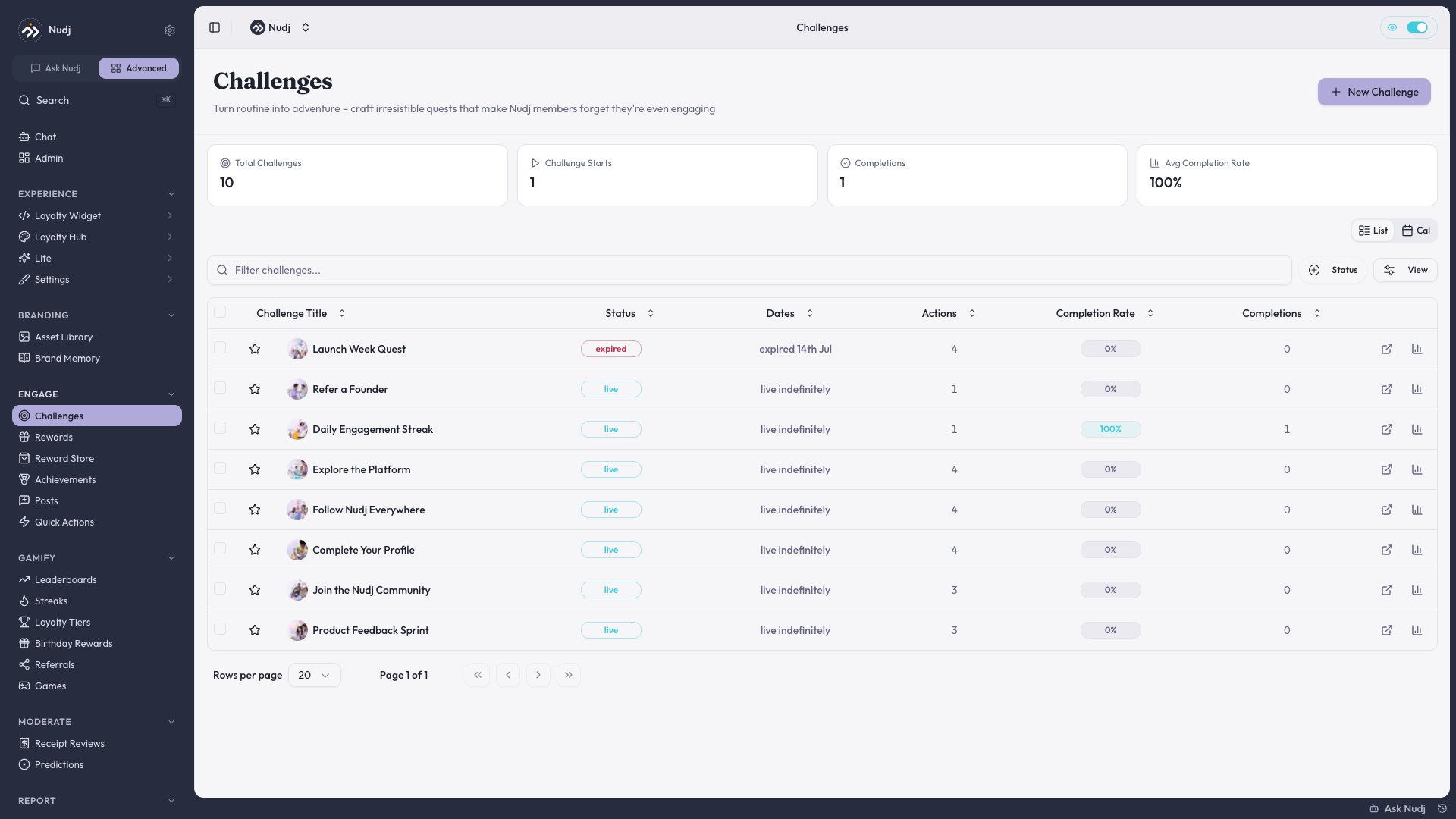
The challenge list: a sortable table with sticky title and action columns, theme-aware status badges, and a Completion Rate column visible by default.
Unified filter drawer
Click Filters to open the drawer (#1017, #1507, #1523, #1540). Available filters:- Status — Draft / Live / Scheduled / Ended / Archived
- Date range — created / start / end
- Tag — any applied tags
- Action type — filter by what’s inside
- Campaign — show only challenges in a specific campaign
Calendar view
Switch to Calendar view (#1511) to see challenges on a month grid. Each challenge appears as a bubble spanning its start -> end dates. Useful for:- Spotting overlap / dead weeks
- Planning campaign timelines
- Scheduling around holidays
Campaigns
Group related challenges into a campaign (#1127) — e.g. “Summer Launch”, “Q4 Loyalty Push”. Campaign members share start/end windows and show up together in the calendar. See Campaigns for setup.Copy-an-item
On any challenge row, the row menu has Duplicate (#1412). It clones the entire challenge — actions, rewards, advanced settings — but excludes date fields (#2142) so you don’t accidentally relaunch a past event. Picks a new name suffix (“(Copy)”) by default. See Copy / Duplicate Items.Bulk edit & archive
Select multiple rows and bulk:- Archive (moves status to Archived)
- Add / remove tags
- Export (CSV of selected challenges + stats)